 HUVA
Workflow guides
On this page
Prepare the receptionist’s clinic answers
Write the process your front desk would explain to a caller.
The guidance matches the instructions your front desk uses and explains who will follow up.
Before you begin
Where: Settings → Receptionist
- Confirm your clinic’s refill, lab-follow-up and referral procedures.
- Decide who follows up and what response time your team can meet.
Use the right settings group
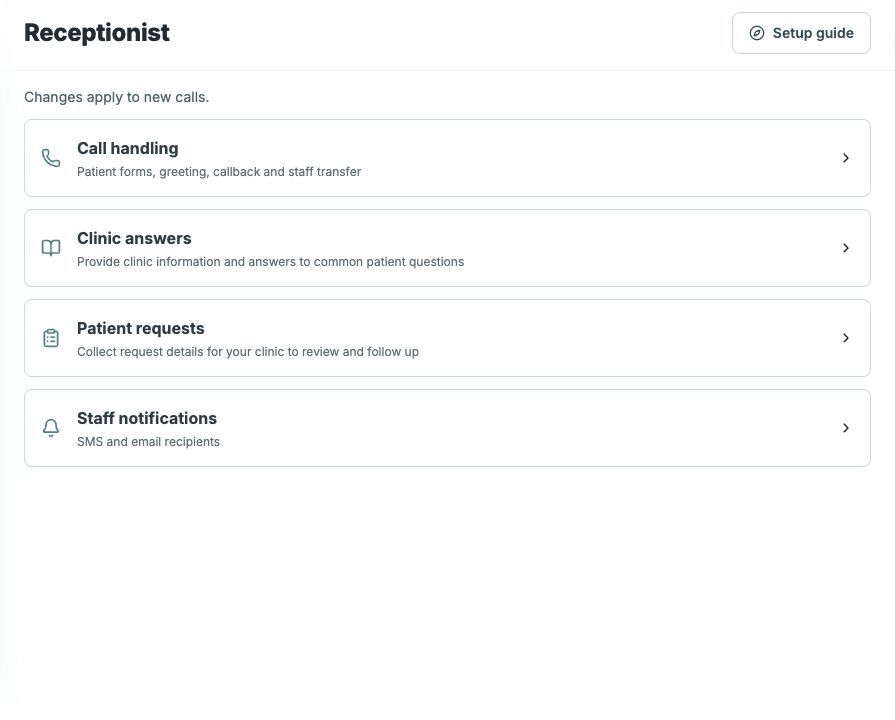
Open Settings → Receptionist. The page groups settings into Call handling, Clinic answers, Patient requests and Staff notifications. Changes apply to new calls.
Edit the clinic guidance
- Expand Clinic answers.
- Open the guidance you want to change.
- Describe the clinic’s procedure and responsible team.
- Save each change.
- Reopen and read the saved guidance as if you were explaining it to a patient.
Check the result
The guidance matches the instructions your front desk uses and explains who will follow up.
Details
Describe who reviews refill requests, who follows up on lab results and how staff confirm appointments.
Troubleshooting
The caller receives different guidance
Reopen Clinic answers and read the saved procedure. Test a new call; capture the non-sensitive mismatch for HUVA if it persists.
Source and product scope
Reviewed 2026-10-20. Editorial source: Notion guide.
Examples use fictional or redacted details or an eCW training chart. Follow your clinic’s permissions and current on-screen instructions. HUVA Scribe is a separate Chrome extension; open the intended Progress Note in the supported EHR. Confirm availability for your clinic with HUVA.