Use Scribe independently. Connect it when your clinic invites you.
Use HUVA Scribe as a Chrome extension within your EHR workflow. If a clinic invites you to HUVA Work, Scribe connects to patient-linked Encounters managed in the clinic’s private cloud.
Current HUVA Work interface shown with fictional demo data.HOW SCRIBE ACCESS WORKS
One clinician identity. Two ways to work.
HUVA Scribe can stand alone for an individual clinician and connect to a clinic’s HUVA Work workspace without exposing unrelated operational menus.
01USE IT INDEPENDENTLY
Complete the EHR note, then confirm.
Use your own subscription and the Chrome extension to capture, review, and complete documentation in the EHR. Select Confirm in Scribe after verifying the saved record.
No HUVA Work clinic invitation required
Temporary transcription data is deleted when you select Confirm
The documentation saved in your EHR remains there
02CONNECT TO A CLINIC
Accept a HUVA Work invitation.
Open Scribe from the clinic’s patient-linked Encounter with the permissions assigned to you. Clinic-connected records are stored and managed in the clinic’s private cloud.
Patient and appointment context are already attached
Clinic retention policies govern stored records
The individual extension’s deletion rule does not erase clinic records
03ROLE-AWARE ACCESS
See only the workspace your role requires.
Invited clinicians receive the clinical access assigned to them. Only clinicians designated as Clinic Admin can see the complete HUVA Work menu, including intake, scheduling, and operational work.
Encounter access for invited clinicians
Full menu access for Clinic Admin clinicians
Clinic-managed invitation and role assignment
BUILT FOR THE CLINICAL WORKDAY
Independent when you need it. Connected when the clinic is ready.
The transcript supports the visit.
Review the transcript while documenting. Individual extension data is deleted on Confirm; clinic-connected records follow clinic retention policies.
The draft keeps its context.
Prior records and clinician cues remain visible while the structured note is prepared.
The clinician controls delivery.
The draft is reviewed and edited before it moves into the EHR workflow.
THE SCRIBE WORKFLOW
From a patient-linked Encounter to an approved EHR Push.
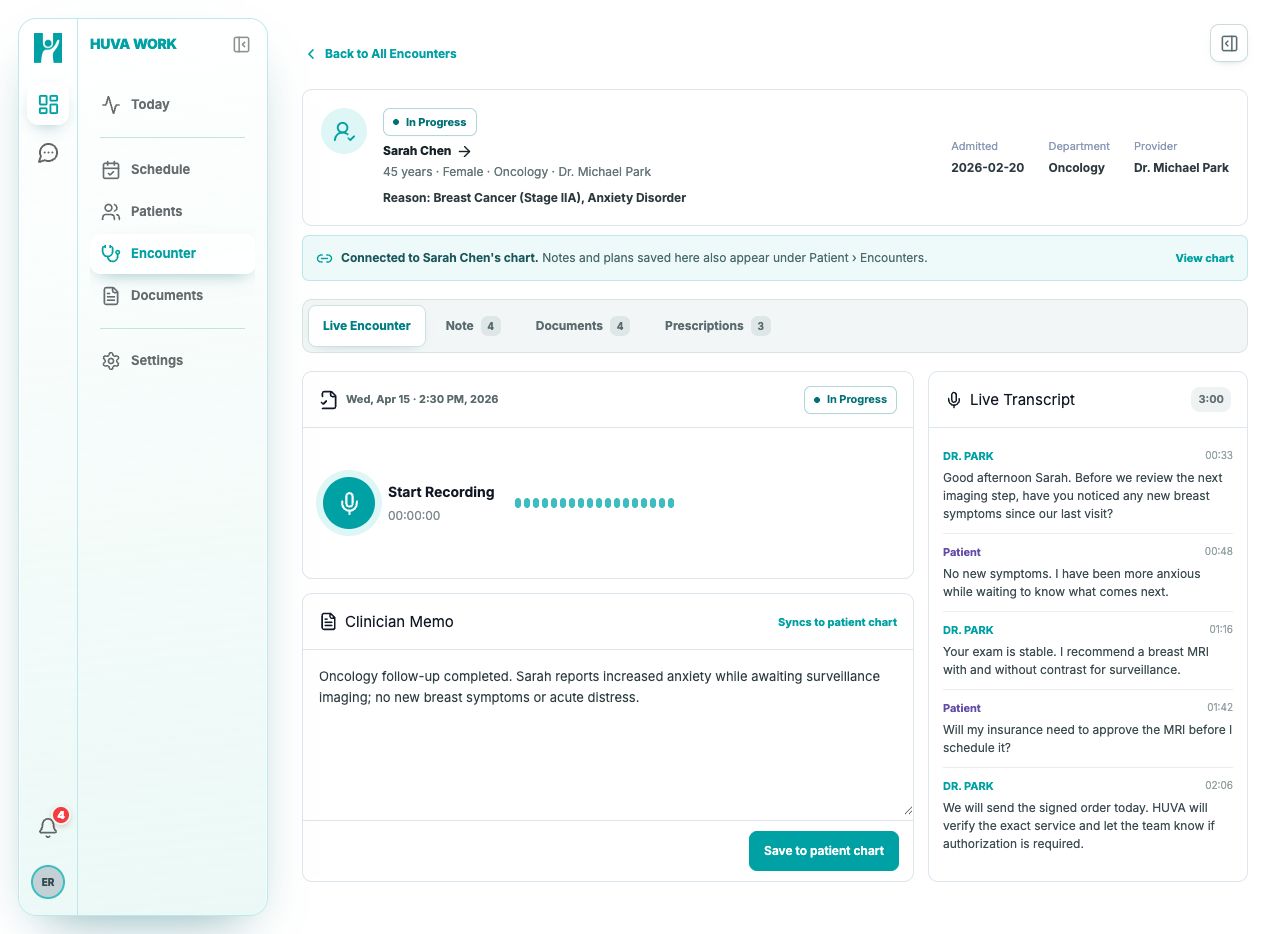
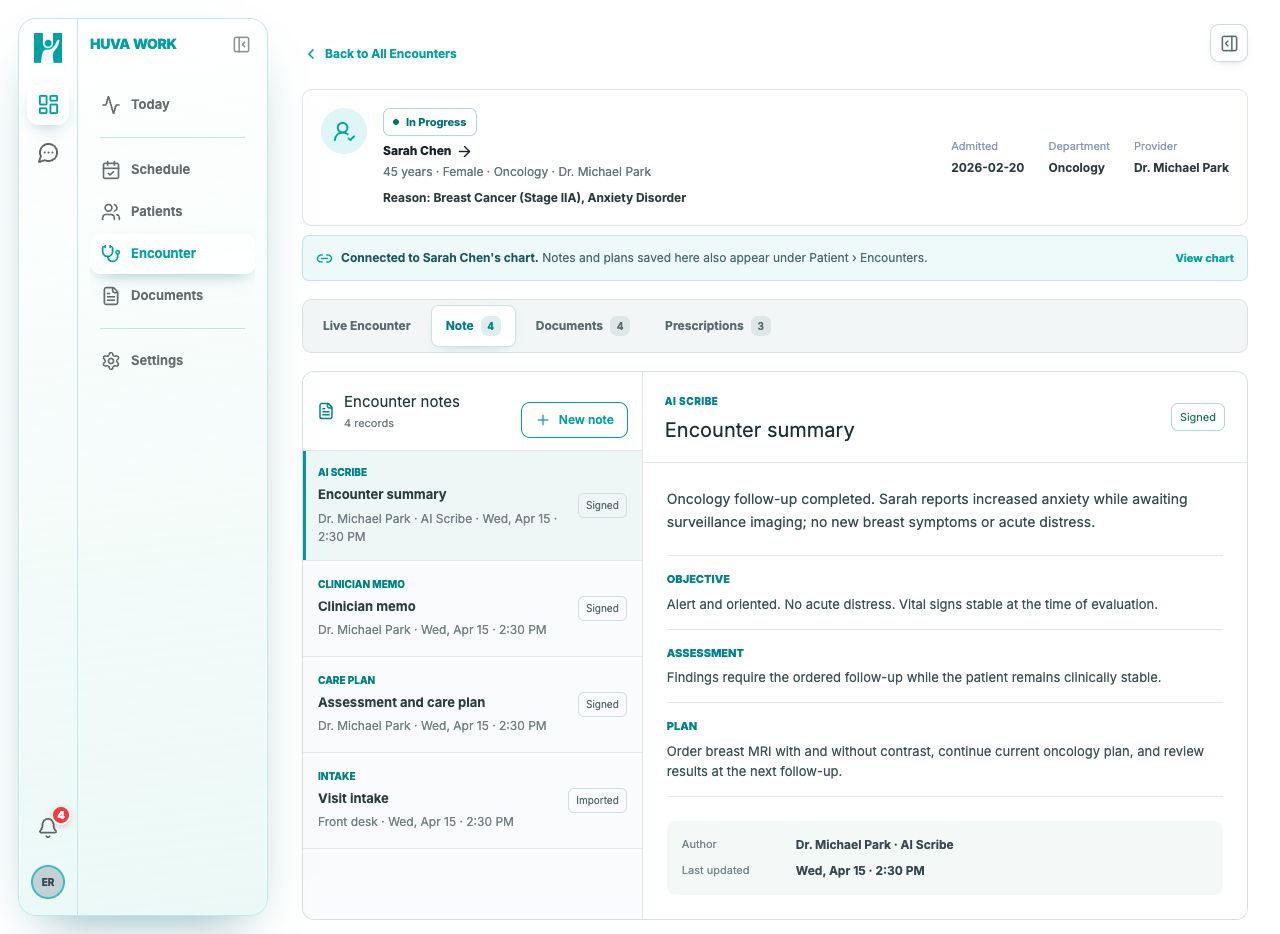
These current HUVA Work screens show how an invited clinician records the visit, reviews the signed note, and initiates approved EHR delivery.
01CAPTURE THE VISIT
Begin independently or from a HUVA Work Encounter.
Independent clinicians use their own HUVA Scribe subscription. Invited clinicians can open a patient-linked Encounter directly in HUVA Work.
Live transcript with speaker context
Visit identity stays attached
Clinician-controlled pause and end controls
02REVIEW IN CONTEXT
The transcript, draft, and patient context stay with the encounter.
HUVA prepares a structured draft while the clinician retains the source, edits the note, and decides when it is complete.
Patient and visit stay matched
Source context remains visible
Clinician editing and approval
03REVIEW AND EHR PUSH
The clinician approves the note, then pushes it to the EHR.
The clinician approves the note, then uses EHR Push or completes documentation within the connected EHR workflow.
Structured SOAP sections
Clinician editing and approval
Visible EHR Push status
01PATIENT-LINKED ENCOUNTER
Open the received patient, record with consent, and keep the transcript and clinician memo tied to the Encounter.
02CLINICIAN REVIEW
Review the structured fields, edit the note, and sign it before any EHR delivery begins.
EHR-CONNECTED DELIVERY
The note moves forward only after the clinician is ready.
Whether Scribe begins independently or from a HUVA Work Encounter, the clinician reviews the note and chooses when it moves into the connected EHR workflow.
01SIGN INUse the clinician’s own HUVA Scribe account.
An independent subscription can later connect the same clinician identity to an invited HUVA Work workspace.
02CAPTUREKeep the visit and its source context together.
The conversation, patient identity, and relevant prior context remain attached while HUVA prepares the structured note.
03REVIEWEdit and approve the clinical note.
The clinician checks the structured fields, makes any needed changes, and chooses when the note is complete.
04EHR PUSHComplete the approved note in the connected EHR.
HUVA supports EHR Push and documentation within the clinician’s existing EHR workflow. Connection availability is confirmed during onboarding.
Clinician approval is the boundary.
HUVA does not push an unfinished draft or silently overwrite the chart.
CLINICAL AND ACCESS CONTROL
HUVA prepares the draft. The clinician and clinic control what opens next.
Consent, note approval, clinic invitations, and role permissions stay explicit across the independent and connected Scribe workflows.
01
Consent and note approval remain visible
The clinician controls recording, editing, signing, and the final EHR Push.
02
Clinic access starts with an invitation
A clinic’s Front Desk invites the clinician before patient-linked Encounters appear in HUVA Work.
03
Full menus require the Clinic Admin role
Invited clinicians see their assigned clinical surfaces. Only Clinic Admin clinicians see intake, scheduling, and the complete operational menu.
REQUEST A FOCUSED DEMO
Show us how documentation works in your clinic.
We will review your setup, prepare a relevant Scribe demonstration, and discuss a controlled path from the visit to EHR Push.
 HUVA
HUVA